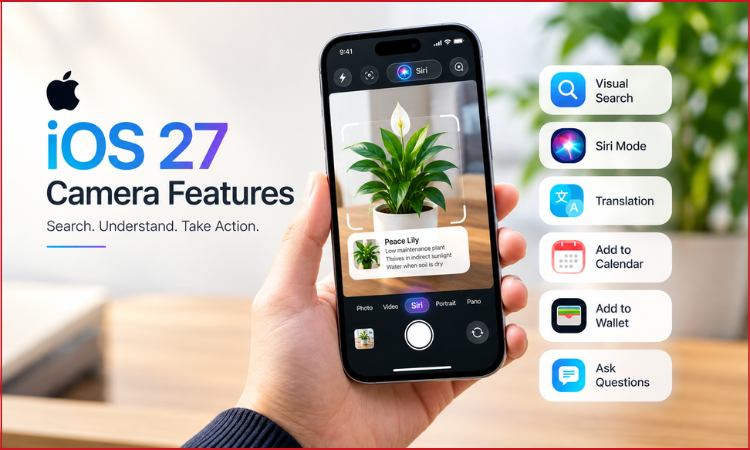
Apple is giving the iPhone Camera app a much bigger role with iOS 27, turning it from a tool for taking photos and videos into a way to search, understand and act on things in the real world.
The biggest addition is a new Siri mode powered by Visual Intelligence, which can identify objects, understand text, answer questions and perform actions based on whatever the camera is pointed towards.
The functionality puts Apple into more direct competition with Google Lens, which has offered visual search and object recognition on Android devices for years.
For iPhone users, however, the important change is convenience. iOS 27 camera features bring these tools directly into the standard Camera app instead of keeping them behind separate menus or shortcuts.
Siri Mode Arrives Inside the Camera App
iOS 27 adds Siri as a dedicated Camera mode alongside familiar options such as Photo and Video.
Users can swipe through the Camera interface until they reach Siri mode, point the iPhone at an object and ask for information about whatever appears in the frame.
The experience is built around Visual Intelligence, Apple’s system for understanding images and real-world surroundings.
Previous versions already offered some visual recognition features, but access was more limited. Visual Intelligence was closely tied to Camera Control on supported iPhones.
The new implementation makes the feature easier to discover because it lives directly inside an app people already use every day.
That could make visual search a much more regular part of the iPhone experience.
iPhone Can Identify What the Camera Sees
The new Siri mode can analyse objects and provide useful information without requiring users to manually describe what they are looking at.
Pointing the camera at a plant, for example, can help identify it and provide care information.
Food can be recognised and accompanied by nutritional details.
Users can also point the camera at animals or other everyday objects and ask follow-up questions.
This brings the iPhone visual search experience much closer to how Google Lens works.
Instead of typing a description into a search engine, the camera itself becomes the search input.
That can be particularly useful when someone does not know the name of an object they want to search for.
Translation Becomes More Immediate
Text recognition is another important part of the upgrade.
A user travelling abroad could point the camera at text written in another language and request a translation.
That reduces the need to manually copy words into a translation application.
The same approach can work with signs, menus, notices and documents.
Visual Intelligence already had text-recognition capabilities, but bringing them directly into Siri mode creates a more conversational experience.
Rather than taking a picture, opening another feature and then searching for information, users can remain inside the Camera interface and ask Siri what they need.
Event Flyers Can Turn Into Calendar Entries
Some of the most useful iOS 27 camera features involve taking action rather than simply providing information.
An event poster or flyer can be scanned by the camera, allowing Siri to recognise important details such as the event name, date and time.
Those details can then be added to the Calendar app.
The feature removes several small steps that would normally be required to create the event manually.
Similar functionality extends to other types of information.
A membership card or printed pass can potentially be captured and added to Apple Wallet when supported, while contact information can be recognised from physical material.
Apple is effectively trying to make the camera an input system for the wider iPhone.
Users Can Ask Follow-Up Questions
The new mode is not limited to identifying objects.
Users can ask Siri specific questions about what appears in the camera frame.
Someone pointing the phone at food could ask how to prepare it rather than simply asking what the dish is.
A user viewing an unfamiliar object could request an explanation of how it works.
This conversational element separates the feature from basic image recognition.
Modern multimodal AI systems can understand both visual information and natural-language questions, allowing users to continue a conversation about what the camera sees.
Apple is bringing that ability into one of the most frequently used apps on the iPhone.
Google Image Search Remains Available
Interestingly, Apple has not attempted to keep the entire experience inside its own ecosystem.
Siri mode includes an option to search Google Images for something shown through the camera.
That gives users another route when Apple’s own AI does not provide enough information or when they simply want to see visually similar results from the web.
The combination makes the feature both a direct alternative to Google Lens and, in some situations, a gateway to Google’s image-search technology.
For users, the distinction may matter less than whether the feature finds the information they need quickly.
Apple Also Changes Camera Controls
Visual Intelligence is not the only Camera app change arriving with iOS 27.
Apple has reorganised several commonly used controls.
Quick-access buttons for features including flash, Live Photos and Night mode have been repositioned towards the top-centre portion of the Camera interface.
Users can also customise which controls appear in that area.
The broader set of Camera tools can be opened from a separate control positioned towards the lower part of the screen.
These are smaller changes than Siri mode, but they affect functions people may use every time they take a picture.
The redesign appears intended to keep frequently used settings within easier reach while reducing visual clutter.
Not Every iPhone Gets the Full Experience
The new AI capabilities require hardware capable of running Apple Intelligence.
Siri mode on iPhone is available on compatible Apple Intelligence devices, including the iPhone 15 Pro and iPhone 15 Pro Max, as well as iPhone 16 models and newer supported devices.
Users must also enable Siri AI to access the full Camera experience.
That means older iPhones capable of installing iOS 27 will not necessarily receive every new artificial intelligence feature.
Siri AI itself is also launching in beta, with availability depending on supported languages and regions.
Also Read : iphone duo vs samsung fold 8
Apple Turns the Camera Into an AI Tool
Smartphone cameras have traditionally competed around image quality, zoom capabilities, low-light performance and video recording.
Artificial intelligence is adding another dimension.
The camera can increasingly understand what it sees rather than simply capture it.
With Visual Intelligence built directly into the Camera app, Apple is making that shift much more obvious in iOS 27.
The practical advantage is that users no longer need to think of visual search as a separate feature.
They can open the same Camera app they already know, point it at something and ask a question.
Google has spent years developing a similar concept through Lens. Apple’s approach now brings many of those ideas deeper into the core iPhone experience while connecting them with Siri, Calendar, Wallet and other parts of iOS.
For iPhone users, that may ultimately be more important than whether the feature is labelled as Apple’s answer to Google Lens. The bigger change is that the Camera app is becoming less about simply recording the world and more about helping users understand and interact with it.